// BarelyArtificialApp-002
Social Media PA
Your virtual PA for social media. Plans what to post, drafts it with you, and tracks whether it actually worked. One board that takes an idea from "we should post about this" through to posted and rated, across every platform you use.
It's not a demo or a mockup. This is the exact tool Barely Artificial uses to plan its own social media, every week.
Instagram, Facebook, X, LinkedIn, TikTok, YouTube, Pinterest, Threads and Google Business Profile, plus any custom platform you add.
What it does
From idea to posted, on one board.
- A Kanban board that mirrors how a post actually gets made: Idea, Planning, Creating, Ready to Post, Scheduled, Posted, Cancelled. Drag a card to move it on, no forms to fill in for a simple status change
- Every post auto-calculates its own "start creating by" date from your lead time, so nothing gets left until the day before
- Two ways to plan ahead: a themed campaign (a launch or sale, with AI varying the angle across posts so it reads as one coherent push) or a recurring posting schedule, either one auto-generating placeholder posts across a date range
- A calendar view lays out everything with a post date by month, so posting gaps and overloaded days are obvious at a glance
- A dashboard that surfaces what actually needs attention this week, plus performance insights on which tone and platform get you the best engagement, built from your own posting history
- A lightweight review flow: flag a post and a note for a teammate, they approve it or send it back with changes, no separate tool needed
- Reusable templates for the posts you make again and again, and a Quick Idea box that captures a thought in one step, from inside the app or straight from your phone's share sheet
- Once a post's date has passed, rate it across five categories (reach, engagement, relevance, content quality, business impact) and log what actually happened, feeding those Dashboard insights over time
- Describe what you want to post about and AI drafts several caption options in distinct tones (warm, snappy, funny, bold, professional), each with a one-line note on why that angle fits your brand, or get a full rewrite or a light polish of something you've already written
- Posting the same news to more than one platform? AI writes a separate variant tailored to each one: concise and hashtag-friendly for Instagram, no hashtag stuffing for LinkedIn, punchy for X, kept as its own tab, not overwritten, with live character-limit counters where a platform has one
- Not sure what to post about? AI suggests ideas that factor in the season, upcoming holidays and what's relevant to your industry right now, not just generic evergreen advice
- On-brand graphics generated from your post's content and your Brand Kit's colours and style: three options to choose from per request, grounded in a real reference photo if you give it one, automatically sized to suit the platform, with carousels and a separate image per platform when you need them
- A hashtag library that learns which tags you actually use and suggests them again, and full version history on every AI-drafted caption so an earlier draft is never really gone
- A Brand Kit (logo, colours, style description) that themes the app itself and steers every AI-generated graphic, set up manually or with AI: point it at your website or an uploaded brand guide and it suggests colours and a style description to accept and edit
- "Help me establish my voice": a short Q&A about your business's personality and audience produces four named tone options to pick from, no blank-page brand thinking required
- Up to five people share one deployment, same board, same Brand Kit. Self-serve invites: generate a one-time link from Settings, no one needs Firebase console access to join
- A daily digest email to each team member with what needs attention in the next 14 days, skipped entirely on a quiet day
- Installable on your phone or desktop like a real app, with automated weekly backups (plus a one-click backup whenever you want one) so your content plan is never one bad afternoon away from gone
Why it's built differently
Built to save actual hours, not add busywork.
Most social planning tools are either a spreadsheet with extra steps or a scheduling tool that assumes you've already written everything. This one starts a step earlier, with "I know roughly what I want to say," and gets you from there to a finished, on-brand post, without ever posting on your behalf.
It's fast (built on Firebase, so there's no server to manage or patch), it works properly on a phone as well as a desktop, and because it's built and maintained by an AI consultancy, you're not just buying software. You're buying the people who know how to get the most out of it.
Campaigns, templates, the review flow, AI itself: every advanced piece can be switched off in Settings, so a business that only needs the basics gets an app that stays simple.
Start to finish
User journey
How a business actually uses it, week to week.
Once, not every time
Business Profile and Brand Kit (manually, or AI-assisted from your website or a brand guide), which platforms you use, and team logins.
A campaign or a schedule
Set up a themed campaign around a launch or sale, or a recurring posting schedule, and placeholders drop onto the Calendar and Dashboard automatically. Or capture a one-off idea directly.
Write it, or let AI start it
Open a placeholder in the Post Wizard: write or AI-draft the text, pick platforms and adjust per platform if it targets more than one, generate or upload a graphic.
Drag it across the board
The card moves through Idea, Planning, Creating and Ready to Post as work progresses. Flag it for a teammate's review if it needs a second pair of eyes.
Copy, paste, done
Copy the finished caption and hashtags, download or copy the graphic, and post it on the actual platform yourself. A couple of clicks, not a chore.
Rate it, learn from it
Once the post date passes, rate it and log what happened. That history is what feeds the Dashboard's performance insights over time.
See it for real
Real interface, realistic data, no mockups.
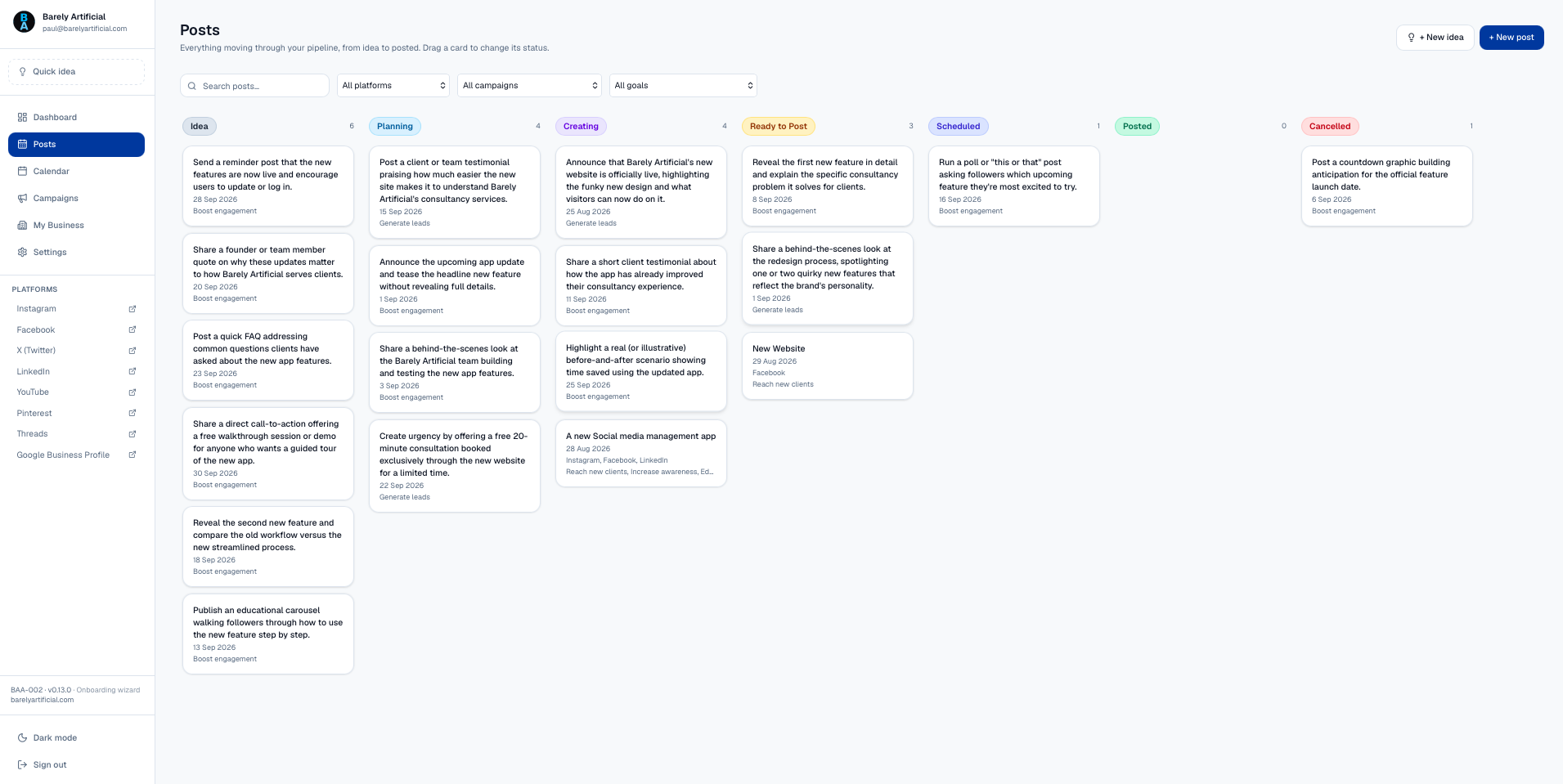
The board that takes a post from first idea to posted — drag a card to move it on.
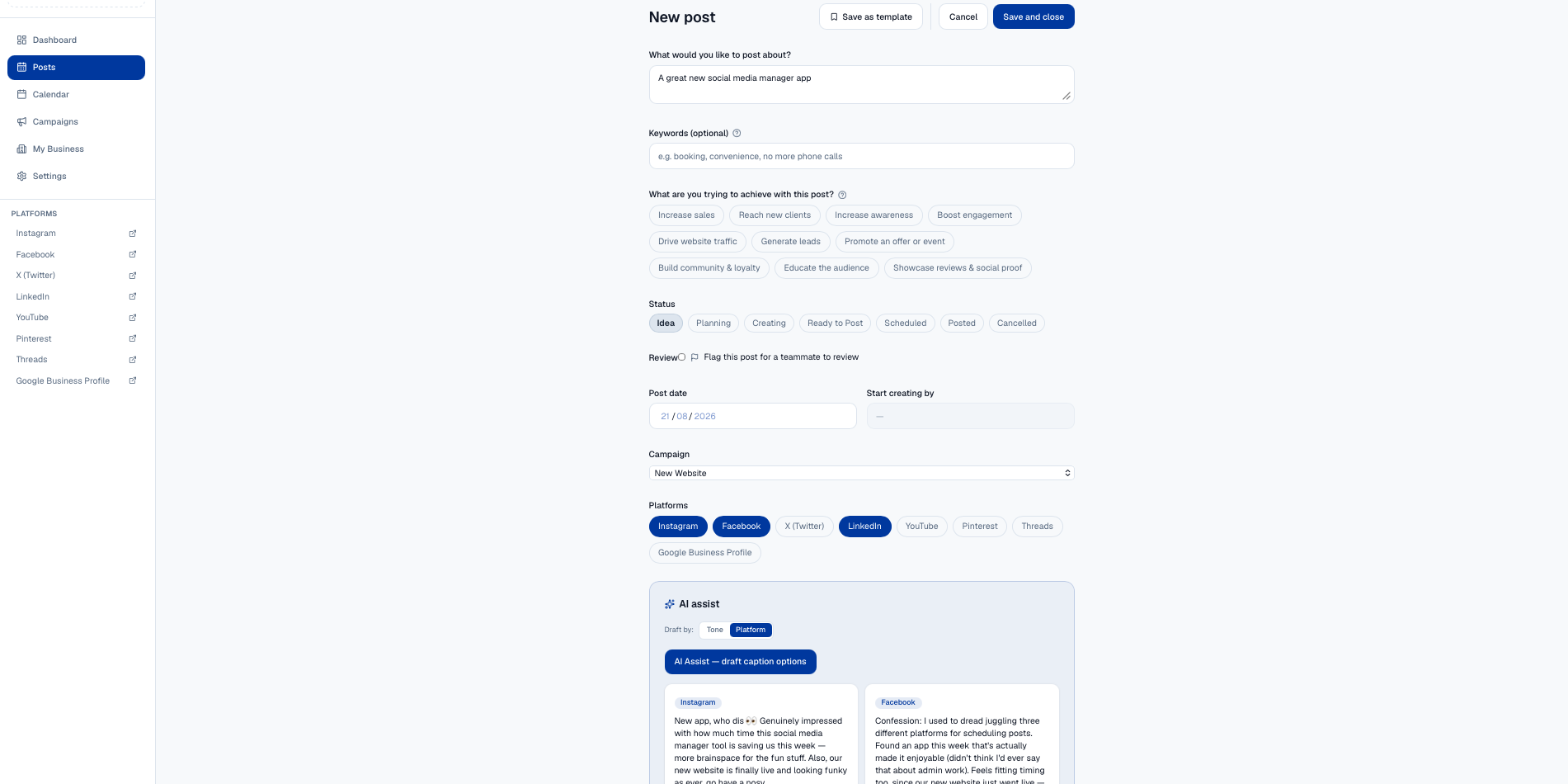
Describe what you want to post about, and AI drafts several options — pick the one that sounds like you.
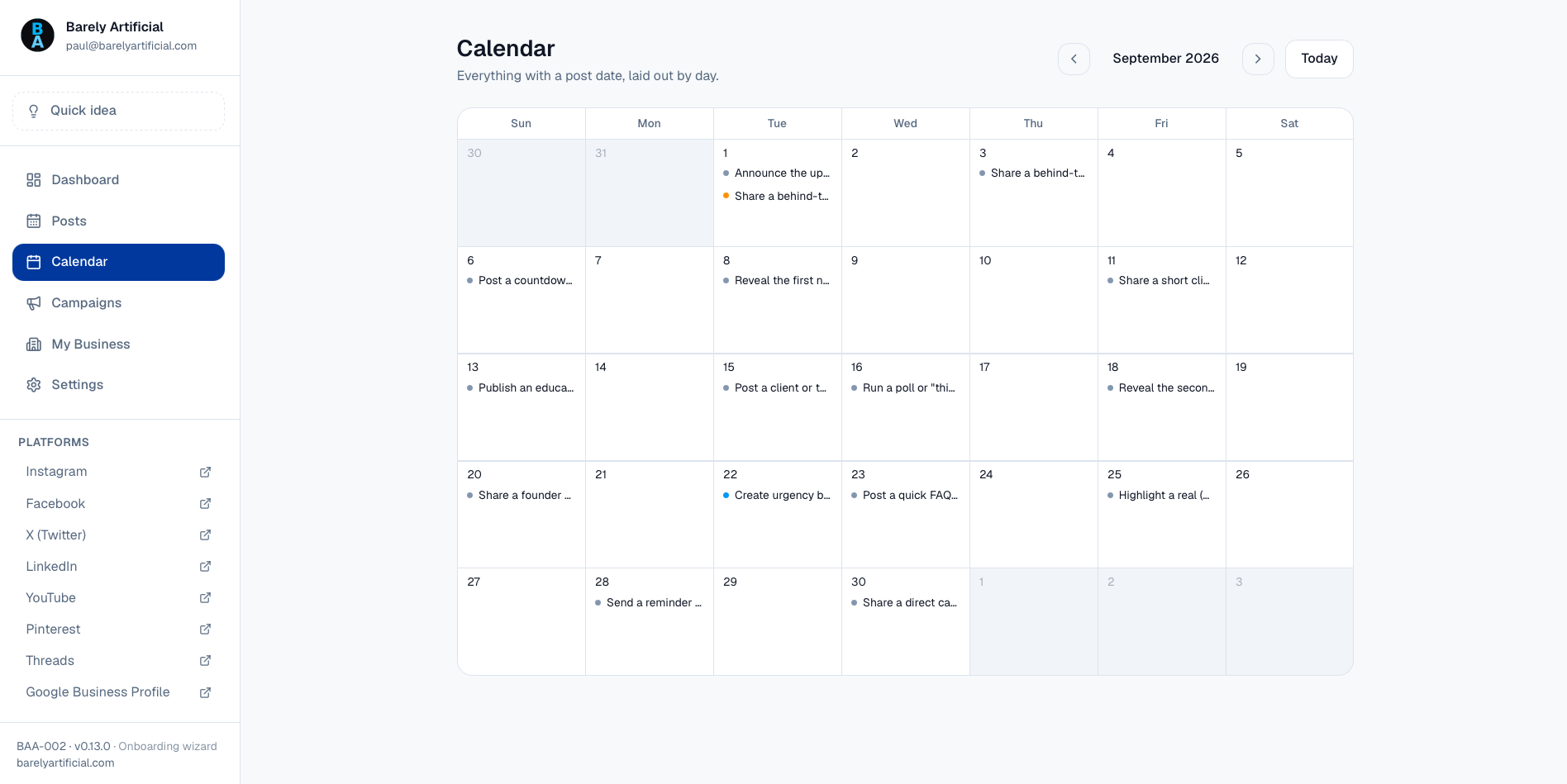
Every post with a date, laid out by month — gaps and overloaded days, visible at a glance.
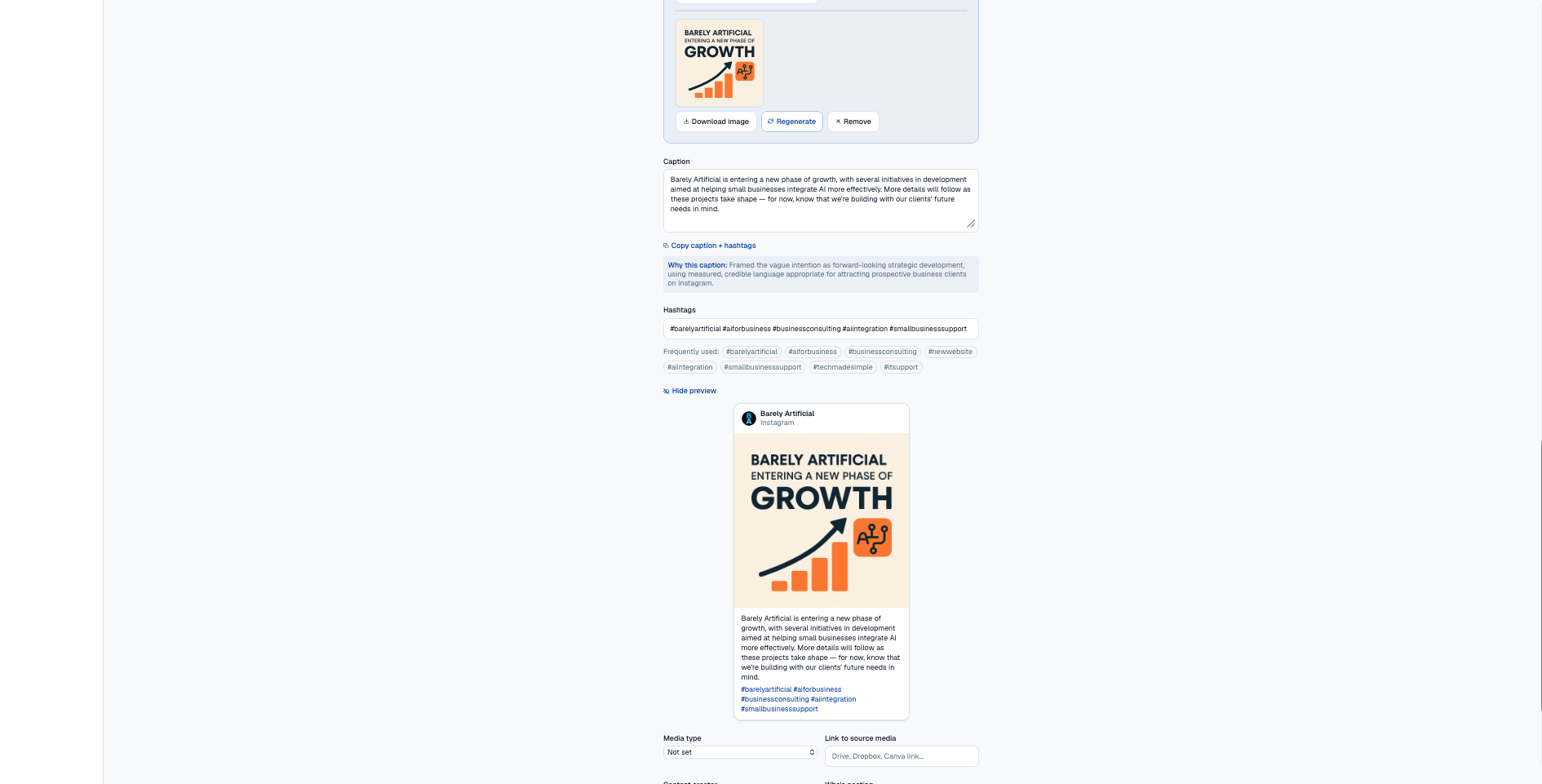
On-brand graphics generated from your post's content, with a live preview before you publish.
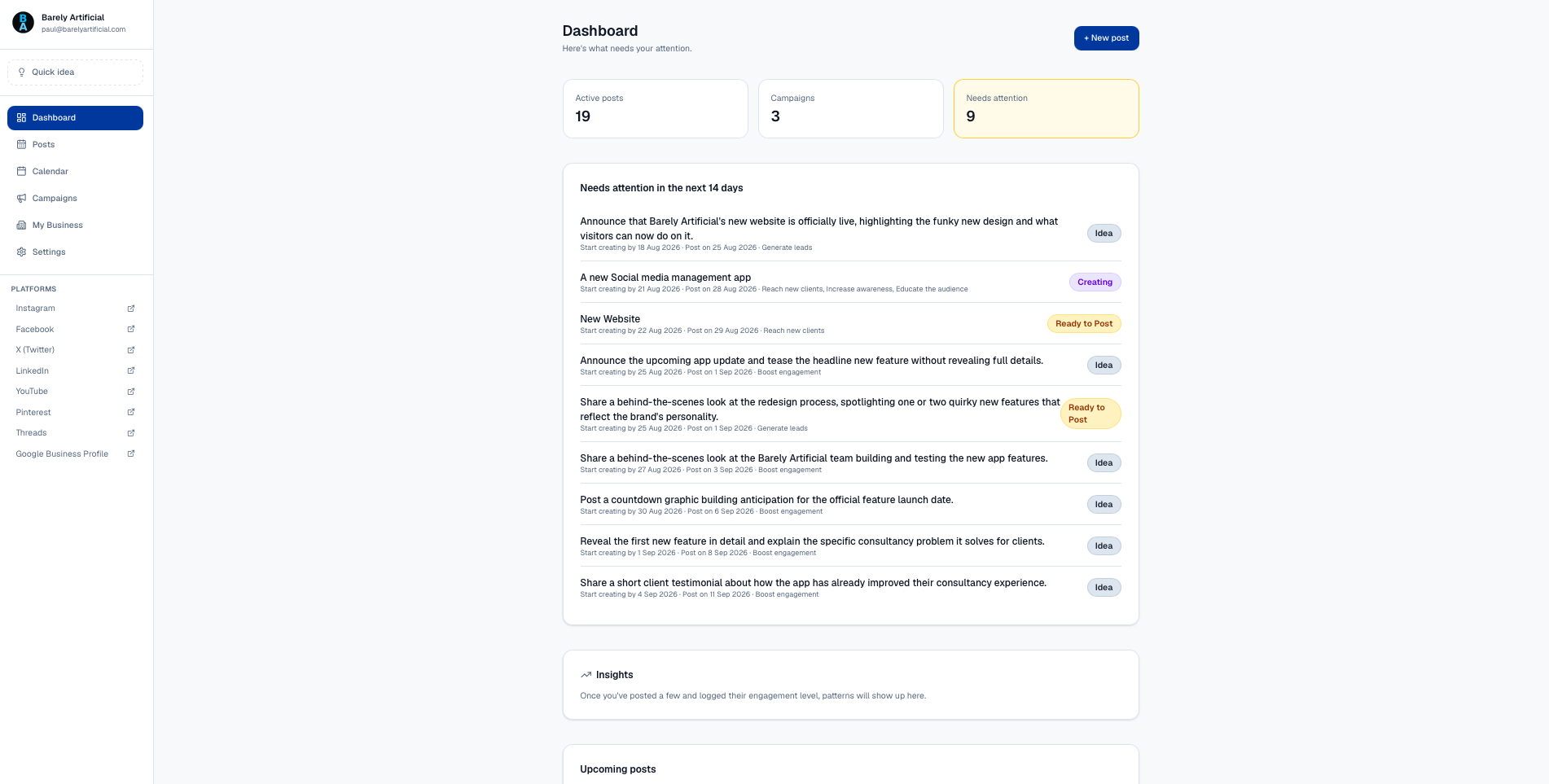
What needs attention this week, all in one place.
Watch it in action: drafting a post and generating on-brand graphics, start to finish.
Worth knowing
It won't post for you, out of the box.
Every major social platform gates automated posting behind its own developer approval process, some longer than others. Meta specifically requires app review before any tool can publish to Instagram or Facebook on your behalf. Out of the box, Social Media PA gets a post drafted, on-brand and approved, then it's a simple copy and paste from the app into the social platform itself, a couple of clicks, not a chore.
If you want genuine one-click publishing from inside the app, we can look at getting the right API access approved for your accounts specifically. That's a "Branded to you" or "Built around you" conversation below, not something switched on by default.
How you can have it
Three ways to get it working for your business.
Out of the box
Deployed and ready to use, as it stands today.
Branded to you
Same functionality, restyled with your colours, your logo and your copy, so it looks like your own product from the first login.
Built around you
Features added, removed or changed to match exactly how your business works. This route needs a proper scoping conversation first, since the amount of work depends entirely on what you need.
Which fits your business?
If you'd like to know more, or would like a demo, get in touch.